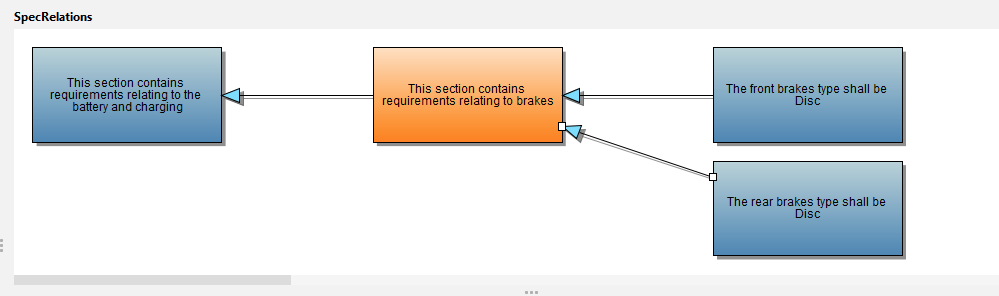
SpecRelations Diagram Window
The SpecRelations diagram window is designed to enable visualization of SpecRelations. It consists of a number of interconnected rectangles where each rectangle represents a SpecObject. The currently selected SpecObject in the Tree Window is the orange rectangle. All other SpecObjects are represented as blue rectangles.
Incoming and Outgoing SpecRelations
From the perspective of the currently selected SpecObject, an incoming SpecRelation is one where the current SpecObject is the target of the SpecRelation. An outgoing SpecRelation is one where the current SpecObject is the source of the SpecRelation. You can easily identify whether a SpecObject has incoming or outgoing SpecRelations in the Tree Window.
A SpecObject with an incoming SpecRelation has a green arrow pointing towards the requirement text

A SpecObject with an outgoing SpecRelation has a red arrow pointing away from the requirement text

SpecObjects with both incoming and outgoing SpecRelations will have both green and red arrows.

SpecRelation Diagram
When a SpecObject that is referenced as either the source or target in any SpecRelation is selected in the Tree Window, it is also shown in the SpecRelations diagram window as an orange rectangle. if it has incoming or outgoing SpecRelations, these are preresented as arrows connecting to other SpecObjects drawn as blue rectangles.
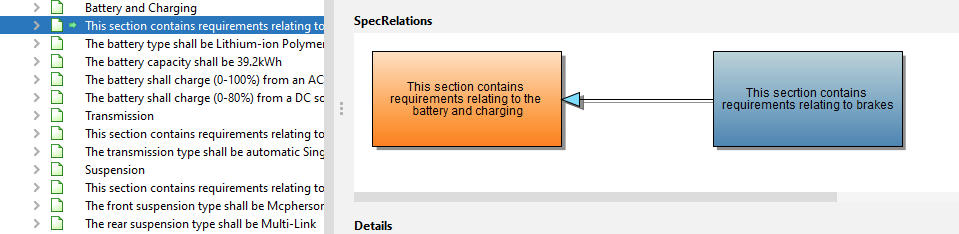
To view the SpecRelation, click on the arrow. This will reveal the properties of the SpecRelation in a Details Window displayed below the diagram. The information that is displayed in this window is the same content as for the SpecRelation node.
To view any SpecObject that is interconnected via a SpecRelation, select the rectangle to view the SpecObject details below the diagram.
More complex diagrams are shown for SpecObjects havinog both incoming and outgoing SpecRelations.